
Supposedly Shared OneDrive or SharePoint Files - Access Token Theft
You receive a message without prior notice and without any context that a file has been shared with you.

Special Case: Supposedly Shared OneDrive or SharePoint Files
It could be completely legitimate to receive an email stating that someone you work with has granted you access to a file via Microsoft SharePoint:
“… hat Ihnen Zugriff auf die Datei … gewährt”
“… shared a document with you”.
- When BOKU members share files with other BOKU members, NO additional code is required.
- When files are exchanged between non-BOKU members and BOKU members, recipients receive an additional email containing an account verification code.
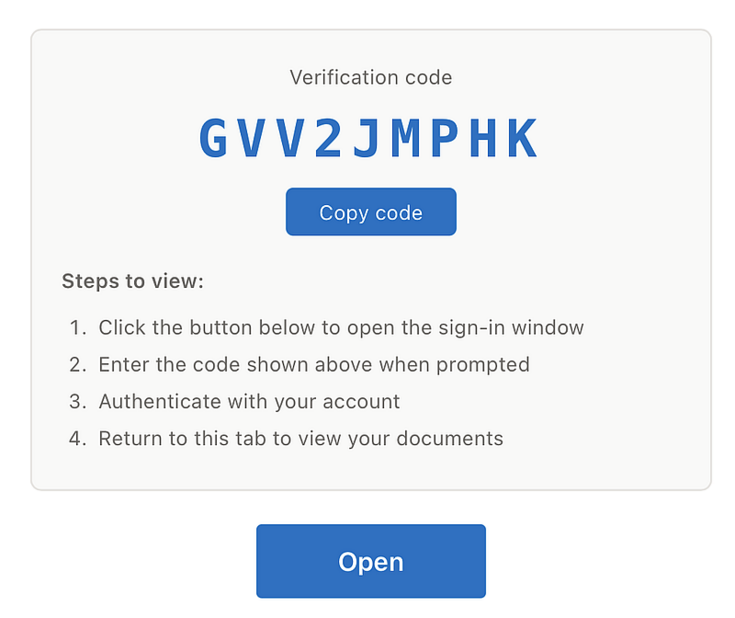
However, if you see a device code in the same email that you are asked to enter on another page where you are supposed to log in with your Microsoft credentials, this is an attack!
In this so-called Access Token Theft or Device Code Phishing, it is not the password that is stolen, but an access or session token that has already been issued. As soon as you, the user, enter the device code, the attacker receives the valid access token from Microsoft. The attacker now has full access and can act as if you were logged in yourself.
What is device code phishing?
The device code authentication process (Device Code Flow) is actually a legitimate part of the OAuth 2.0 standard. It was developed for devices with limited input capabilities, such as smart TVs, printers, or IoT devices, on which a standard login window cannot be used. The device displays a short code, which the user enters in a browser on a second device on an official Microsoft page.
Attackers exploit this exact process. They initiate such a sign-in process themselves, generate a valid device code, and trick the victim into entering this code on the genuine Microsoft sign-in page via a phishing message.
As soon as the victim completes the process with their credentials and MFA confirmation, the valid login tokens do not end up on the user’s device but go directly to the attackers.
Why is this so dangerous?
The critical point is this: No password in the traditional sense is stolen, and there is no fake login page. The login process takes place entirely through Microsoft’s genuine infrastructure. As a result, many established security mechanisms do not function as they normally would. The stolen access and refresh tokens grant attackers permanent access to the account—often even after the victim changes their password. With this access, attackers can read emails (not yet possible at BOKU), access files in OneDrive and SharePoint, read and send Teams messages, and navigate further within the corporate network.