
BOKUcard for Staff
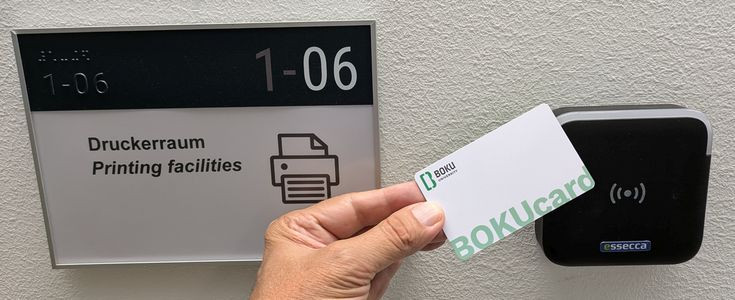
BOKUcard for Employees: Printing, Copying, Access
The BOKUcard for employees is an electronic chip card in the size of a debit card. It can be read both by people and by machines. The BOKUcard is used for authentication and to access new features such as Secure Printing and Follow Me Printing on BOKUprint multifunction devices.
Additional planned uses include: ID card (employee “ID,” electronic key, etc.). Detailed plans for any implementations beyond its current use as a printing, scanning, and copying card are still pending.
How do I obtain a BOKUcard for employees?
Every BOKU employee can request a BOKUcard directly in BOKUonline. All incoming orders are printed by BOKU-IT and sent via internal mail to the department of the organizanional unit of the person placing the order.
Sending the card to the head is necessary for verification purposes, as the BOKUcard may, under certain circumstances, grant authorization to print at the department’s expense. Therefore, it is not possible to send the card directly to the employee or the department secretary.
Request a BOKUcard via BOKUonline
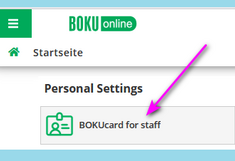
After logging into BOKUonline, you’ll find the “BOKUcard for staff” application on your personal profile page under “Personal Settings.”
Please note the status message: If a card has already been issued to you, or if the order is still being processed, you cannot place another order. If the status message is incorrect, please contact the BOKU-IT Hotline.
To place a new order:
- Check the box next to “Ich möchte eine BOKUcard (Kopierkarte) erhalten” (“I would like to receive a BOKUcard (copy card)”
- Select whether you want the card with or without a printed photo
- Upload a photo if desired
- Click "Änderungen speichern" (“Save changes”)
Deactivating the BOKUcard
In the event of theft or loss of your BOKUcard, please block the card immediately to prevent potential misuse! To do so, click on the link “BOKUcard for Staff” on your personal BOKUonline profile page, and then click the button: “Deactivate myBOKUcard immediately”.
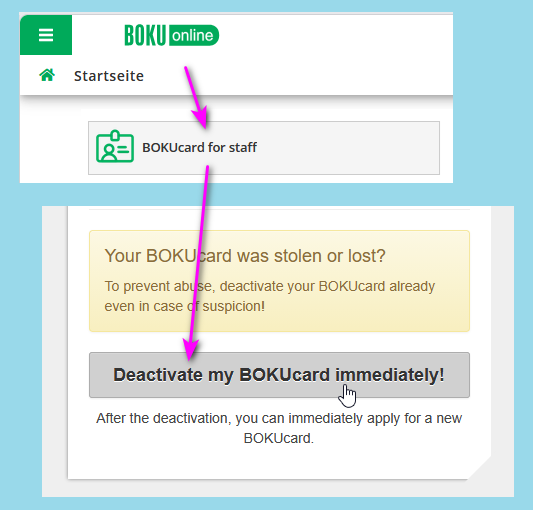
For security reasons, blocked cards CANNOT be unblocked or reactivated.
Requesting a replacement BOKUcard
After the card has been blocked, you can request a new BOKUcard as described above.
You can therefore also have the card deactivated if you would like to have a new card issued due to damage to the card, a name change, or a new photo.
After you have requested the BOKUcard via BOKUonline, the new BOKUcard will be printed by BOKU-IT and sent via internal mail to the head of your organizational unit . Please check with the head of your organizational unit if necessary.