Microsoft 365 - Requesting a Team
To ensure the standardized setup of teams and appropriate life cycle processes, the creation of teams is not handled via self-service but exclusively through a request form via BOKU-IT.
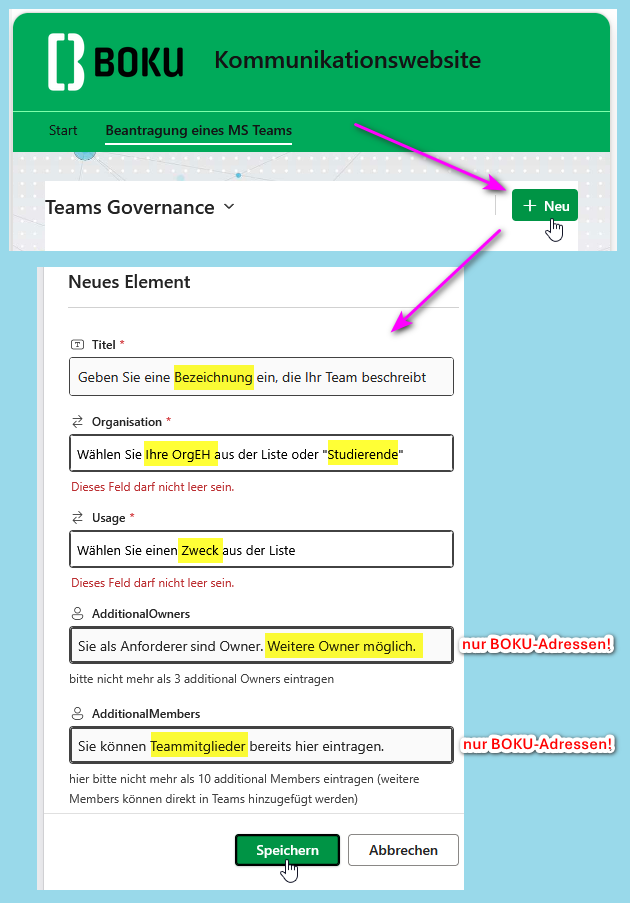
Please fill out the form on the following “Teams Governance” SharePoint page for each desired team.
- Log in to the following page using your BOKU standard email address and your BOKU password:
- Click the button ‘ + Add New Item’.
- Fill out the corresponding form fields and click ‘Save’.
After successful review by BOKU-IT, the team will be activated and you, as the requester, will be notified.
As the requester, you are automatically the owner of the team.
Once the team has been created, you or other owners can add or remove additional owners and members directly via the Teams app.
If there is prolonged inactivity in existing teams, the owners will be notified. If no actions are taken in the specific teams, the teams will be archived after a further period of time.