
BOKUlearn FAQ for Students
General information on the learning platform BOKUlearn
What is the difference between BOKUonline and BOKUlearn?
BOKUonline, the university’s campus management system, supports administrative processes and serves as the official, legally binding publication medium for matters such as examination regulations and grades.
BOKUonline is also used, among other things, for:
- Managing student accounts
- Registering for courses and examinations
The learning platform BOKUlearn supports teaching with tools for:
- Providing learning content and teaching materials
- Conducting online exercises and examinations
- Administering and organizing courses
- Communication
For every course in BOKUonline, a corresponding BOKUlearn course is automatically created, which is initially invisible to students. Lecturers decide themselves whether they wish to use this course and make it visible to students.
How can I access the learning platform BOKUlearn?
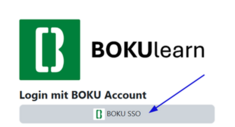
You can access the BOKUlearn learning platform via https://learn.boku.ac.at. To log in, please click on “BOKU SSO” and then enter your BOKUonline login details.
Please note: As with all BOKU systems, multi-factor authentication (MFA) is also required for BOKUlearn.
Who has access to BOKUlearn?
Access to the BOKUlearn learning platform Moodle is available to:
- all BOKU staff members
- all students with a valid BOKUonline account and active student status
If you have questions about your student status, Study Services will advise you.
How can I get access to BOKUlearn courses as a student from another university?
Students from other universities may be granted access to BOKU’s e-learning systems as part of inter-university cooperation agreements.
Please note: If confirmations, certificates or similar documents are required, co-enrolment is usually necessary. In such cases, you generally need to register via Study Services and BOKUonline. Once your access has been set up, you can log in using the “BOKU SSO” button. If you have any questions, please contact Study Services directly.
How can I log in with a “manual account”?
How can I log in as a guest?
How can I set my preferred language in BOKUlearn?
Click on the small arrow (1) next to your profile picture in the menu bar and select “Sprache/Language” (2) in the user menu. You can then choose your preferred language (3).
From this point on, all system-generated information will be displayed in the selected language.
Please note:
- Teachers can set a specific course language for individual courses. These courses will always be displayed in the language specified.
- Content provided by teachers, such as PDF files, is not translated automatically.
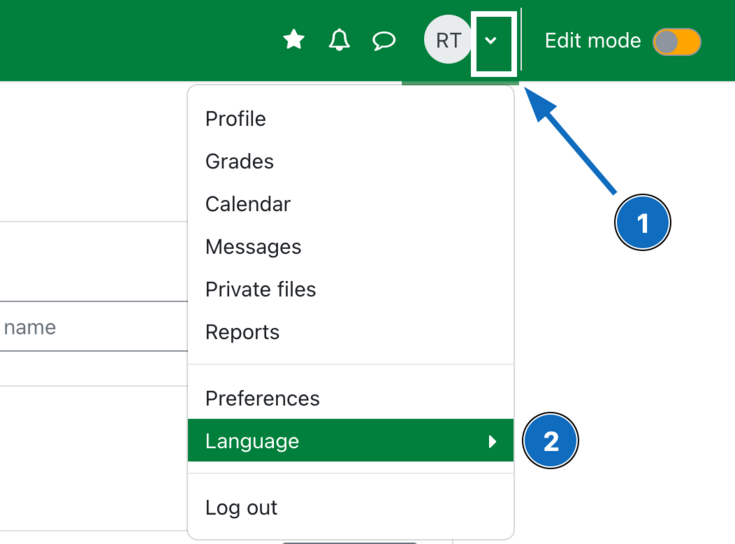
Fig. 3
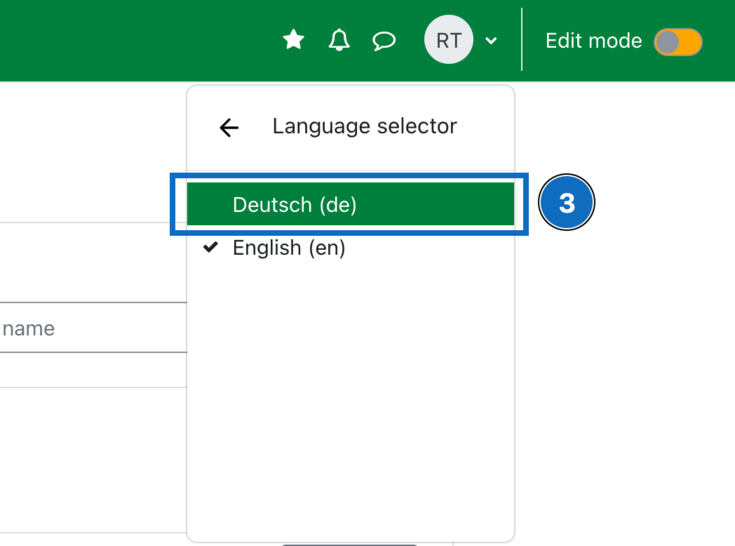
Fig. 4
How can I set my preferred language in a BOKUlearn course?
As described above under “How can I set my preferred language in BOKUlearn?”.
Exceptions:
- Teachers can set a specific course language for individual courses. These courses will always be displayed in the language specified.
- Content provided by teachers, such as PDF files, is not translated automatically.
Accessibility
I use the learning platform with assistive technologies. I cannot access certain content. Who can I contact?
Please report any accessibility barriers in BOKUlearn to e-learning(at)boku.ac.at. When reporting an issue, please describe the problem and include the full URL of the affected page or document. We will review your request and get back to you as soon as possible.
If you experience accessibility issues with materials or activities in a specific course, please also contact the teaching staff. They can usually provide an accessible alternative most quickly.
For questions about accessibility and disability-related support during your studies, please contact the Coordination Office for Gender Equality, Diversity and Accessibility (kostelle(at)boku.ac.at).
Course registration
Do I have to register separately for the BOKUlearn courses?
Registration for courses is done in BOKUonline.
Overnight, all course registrations (BOKUonline) are transferred to BOKUlearn so that students with a fixed place are automatically enrolled in the corresponding BOKUlearn courses on the following day. If you still cannot see your courses on the following day, they have probably not yet been made visible by the teachers. Further possible reasons are described in the next section.
Why does BOKUlearn not show all courses for which I am registered in BOKUonline?
If courses for which you are registered in BOKUonline do not appear in your BOKUlearn dashboard (course overview), this may be due to the following reasons:
- Course registration on the same day:
Changes in BOKUonline do not appear in BOKUlearn until the following day.
- The course is still invisible for students:
Especially at the beginning of the semester, there are many courses that have not yet been made visible by the lecturers. This often happens shortly before or after the start of the semester. In case of doubt, please check with BOKUonline or contact the lecturer directly via e-mail.
- The teacher does not use the BOKUlearn course:
Teachers are free to use the e-learning platform to support their courses. Tipp: Zoom links etc. are often stored in BOKUonline.
- No fixed place or waiting list place: BOKUlearn courses are only accessible to students with a fixed place. Manual course enrolment of students on a waiting list can only be carried out by the teachers.
- An incorrect semester was selected in the dashboard: Courses are usually assigned to a semester. If the BOKUlearn course is not displayed, this may be because you selected the wrong semester in the dashboard or because the course was moved by teachers to the category “Other”, for example in the case of cross-semester courses.
- The course is hidden or the filter "Removed from view" is selected:
In the context menu to the far right of the course name (marked by three dots), courses can be hidden from students and shown again. If the course overview is filtered by "Courses removed from view", only the hidden courses are displayed.
- Change-over from Bachelor's to Master's degree programme:
In case of a change of study plan, it may happen that the courses are temporarily not displayed.
- Change of e-mail address in BOKUonline:
If your e-mail address is changed and entered in BOKUonline (e.g. due to employment as a "student employee"), the courses will not be visible again until the following day after the nightly synchronisation.
Tip: Make the change to your email address at a time when you no longer need your courses for the rest of the day. The change will be introduced during the nightly synchronisation of BOKUonline and BOKUlearn and in the morning the courses will be available to you as usual.
- "Course overview" block has been removed:
You can customise the dashboard (personal start page) in BOKUlearn according to your preferences. If you delete the "Course overview" block by mistake, you can restore the default settings by clicking on "Edit this page" in the top right-hand corner and then on "Restore default".
Error message: "You cannot enrol yourself in this course."
How can I deregister from BOKUlearn courses?
Availability of course content
Where can I find the zoom link for a course?
Zoom links should usually be available in BOKUonline in the course details, in the area where course dates and sessions are listed. Sometimes teachers forget to add Zoom links in BOKUonline. In that case, the links can usually be found in the corresponding BOKUlearn course. If not, please contact the teachers directly.


How long can I access a BOKUlearn course?
Teachers decide individually how long students can access the courses and the materials they contain.
Tip: Save important documents outside the BOKUlearn course. For quick downloading, we recommend the „download center“, which is available in every course. You will find the link directly below the course heading. This allows you to download the course content as a ZIP file in just a few clicks.
How long do I have access to BOKUlearn?
After the end of a BOKU degree programme, the Account Termination Process starts automatically. This is an automated process in which access rights are deactivated step by step until access is no longer possible.
Please note: If tuition fees and the Austrian Student Union fee are not paid on time, students are automatically deregistered and will lose access to BOKUlearn with immediate effect.
More information on specific BOKUearn modules
Can I try out BOKUlearn tools?
Yes, a demo course is available where you can try out BOKUlearn in a protected environment.
New students are also encouraged to enrol in the online course BOKUlearn for Students: Information & Tips.
Technical equipment
Which browsers can I use to access BOKUlearn?
I'm having problems – should I clear my cache?
BOKUlearn is a web application. This means that sometimes errors (incorrect display, empty browser window, login problems, endless loading processes, ...) only occur locally in your own browser, because browser cache or cookies have to be deleted. Try to open the page in another browser. If everything works there, the problems can often be solved by clearing the browser cache. Details and how this works can be found on the page Troubleshooting for web applications.
Does BOKUlearn also work on mobile devices?
Why can't I use BOKUlearn with the "Moodle App"?
Contact
Who can I contact if I have questions?
If you have any questions about your BOKUonline account or multi-factor authentication (MFA), please contact the BOKU-IT hotline: boku-it(at)boku.ac.at
For questions about BOKUlearn, please contact: e-learning(at)boku.ac.at
For questions about course content, please contact the teachers directly.